Deepsolv Blog
Deepsolv Blog
Backed by




Creative Decision Intelligence for Meta growth teams. Know what to test next — before you spend on it.
Follow Deepsolv on InstagramFollow Deepsolv on LinkedInFollow Deepsolv on TwitterAll rights reserved © 2026 deepsolv.ai
10 min read
Published: 2/21/2026
1. The Meta Ad Library shows every active ad on Facebook and Instagram: creative, copy, landing page URL, platforms, and start date for free, no login required.
2. The strongest signal for a winning ad is longevity + impressions: any ad still running after 60 days is almost certainly profitable. In early 2026, Meta added impression: volume sorting, making it easy to surface which creatives competitors are actively scaling.
3. Use filters: platform, media type, active status, impressions to go beyond casual browsing. Weekly 30–45 minute audits across 10–20 competitors reveal patterns, gaps, and test hypotheses you can actually use.
4. The library has real limits: no CTR, ROAS, or targeting data; paused ads vanish entirely; and it only covers Meta. Use it to study patterns and structure, not to copy creatives.
5. The Ad Library API enables automated competitor monitoring: pull new ads from your top 10 rivals into a weekly spreadsheet without manual browsing.
Every ad your competitor is running on Facebook and Instagram right now is publicly visible. The creative, the copy, the landing page, the platforms, even how long it has been live: all of it sits in one free, searchable database that most marketers barely scratch the surface of.
The Meta Ad Library (formerly the Facebook Ad Library) was built as a transparency tool. But in 2026, it has become one of the most valuable competitive intelligence resources available to performance marketers, if you know how to use it properly.
This guide covers everything: from accessing the library and using its filters, to the new impression sorting feature, advanced research workflows, API access, and the specific frameworks that separate casual browsing from real strategic insight. Whether you are running Meta ads for a D2C brand, an agency, or a SaaS product, this is the reference you will come back to.
The Meta Ad Library is a publicly accessible, searchable database of every active advertisement running across Meta's platforms: Facebook, Instagram, Messenger, and the Audience Network. Anyone can access it without logging in or creating an account.
Meta launched it in May 2018 after the Cambridge Analytica controversy, originally focused on political ad transparency. It has since expanded to cover every ad category, making it the largest publicly available advertising database in the world.
When you look up an ad in the library, here is what you can see:
What you will not see is equally important to understand. The Meta Ad Library does not show click-through rates, conversion data, cost per result, ROAS, or precise targeting parameters. It is a transparency tool, not an analytics dashboard. The strategic value comes from what you can infer from the data that is available and that is what we will cover in depth.
There are three ways to get into the library.
Direct URL access. Go to facebook.com/ads/library in any browser. No login required. Select your country from the dropdown, choose an ad category (select "All ads" for commercial research), and search by advertiser name or keyword.
From any Facebook Page. Visit a competitor's Facebook Page, scroll to the "Page Transparency" section in the About tab, and click "Go to Ad Library." This takes you directly to that advertiser's complete ad portfolio.
From a sponsored post. When you see a sponsored ad in your Facebook or Instagram feed, tap the three-dot menu, select "Why am I seeing this ad?", and navigate through to "See ad details in Meta Ad Library." This is useful for investigating ads that caught your attention organically.
For serious research, the desktop browser experience is significantly better than mobile. The filtering options are more accessible, the ad previews are larger, and you can open multiple ads in separate tabs for comparison.
The power of the Meta Ad Library is in its filters. Without them, you are scrolling through hundreds or thousands of ads with no way to prioritize what matters. Here is what each filter does and when to use it.
Country. Filters ads by the region they are targeted to. If you are running ads in India, select India. If you want to see how a global brand localises its messaging, compare the same advertiser across multiple countries. US and UK ads often differ significantly in tone, pricing psychology, and trust signals.
Ad category. "All ads" covers commercial advertising and is the default for competitive research. The other categories (issues/elections/politics, housing, employment, credit) have additional transparency data but are restricted to specific ad types.
Platform. Filter by Facebook, Instagram, Messenger, or Audience Network. This is more useful than most marketers realise. A competitor might run polished video on Instagram Reels but rely on long-form copy with static images on Facebook Feed. Filtering by platform reveals how they adapt creative to different audiences and placements.
Media type. Filter by image, video, or meme. If you want to study a competitor's video ad strategy specifically, this filter isolates exactly that. It is also useful for spotting format trends, if your entire niche has shifted toward video, and you are still running static images, that is a signal worth paying attention to.
Active status. Toggle between active and inactive ads. Active ads show what competitors are currently investing in. Inactive ads show what they have tested and killed which can be just as instructive. An ad that ran for only three days and stopped was likely underperforming.
Language. Useful for brands targeting multilingual markets. Filter to see ads in Hindi, Spanish, French, or any language relevant to your audience.
Impressions by date. This is the filter that changed significantly in early 2026. Meta added the ability to sort ads by impression volume, which was previously not possible. Before this update, you could only filter by date ranges, which told you when an ad ran, but not how much reach it had.
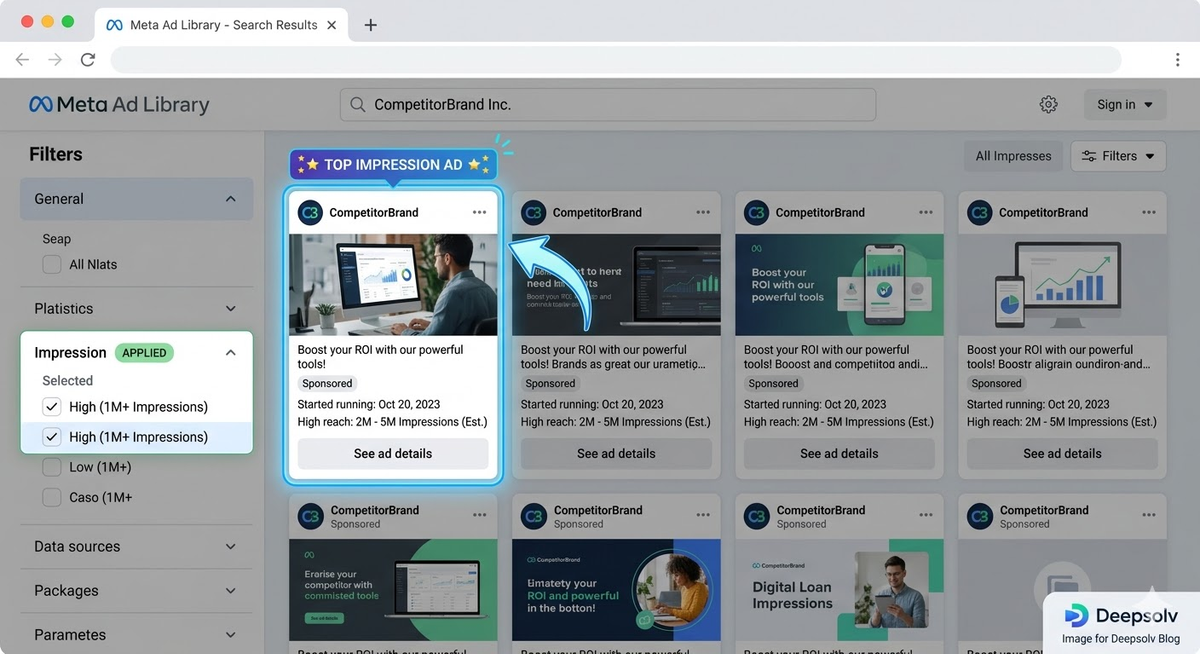
Now, the impression filter lets you surface ads that are getting the most distribution. High impressions generally indicate higher budget allocation, which in turn suggests the advertiser is confident in that creative's performance. Combined with the active status filter, this becomes the single most reliable way to identify which specific ads a competitor considers their winners.
How to use impression sorting effectively: Search for a competitor, filter by active ads, and sort by impressions. The ads at the top are the ones being scaled, meaning the advertiser has passed their internal performance benchmarks and is actively increasing spend. These are the creatives worth studying in detail.
This is where most marketers go wrong. They browse the Ad Library, see ads they like, screenshot a few, and move on. That is not competitive intelligence, it is casual browsing.
The real value comes from systematically identifying which ads are actually performing, not just which ones exist. Since the Ad Library does not show performance metrics directly, you need to use proxy signals. Here is the framework.
Signal 1: Longevity. An ad that has been running continuously for 60 or more days is almost certainly profitable. No advertiser keeps spending on a losing creative for two months. Check the "Started running on" date for every ad and prioritise the oldest active ones.
To put this in perspective: research from VibemyAd across 47,000+ ads found that only about 11% of ads survive past 60 days. The vast majority (nearly half) are killed within the first two weeks. This means any ad still running after two months has passed rigorous internal testing and is in the top tier of that advertiser's portfolio.
Signal 2: Impression volume (new in 2026). Use the impression sorting filter to identify which ads within an advertiser's portfolio are getting the most distribution. High impressions plus long run time is the strongest combined signal of a winning ad.
Signal 3: Variation volume. If an advertiser is running 10-15 variations of the same product ad : same product, different hooks, different visuals, they are in active testing mode. The variations that survive and keep running are the winners. Check back in two weeks: the ones that disappeared were the losers.
Signal 4: Cross-brand convergence. When multiple unrelated brands in the same niche independently arrive at the same creative format, hook structure, or offer framing, that is a market-level signal. It means that format is working across the category, not just for one advertiser.
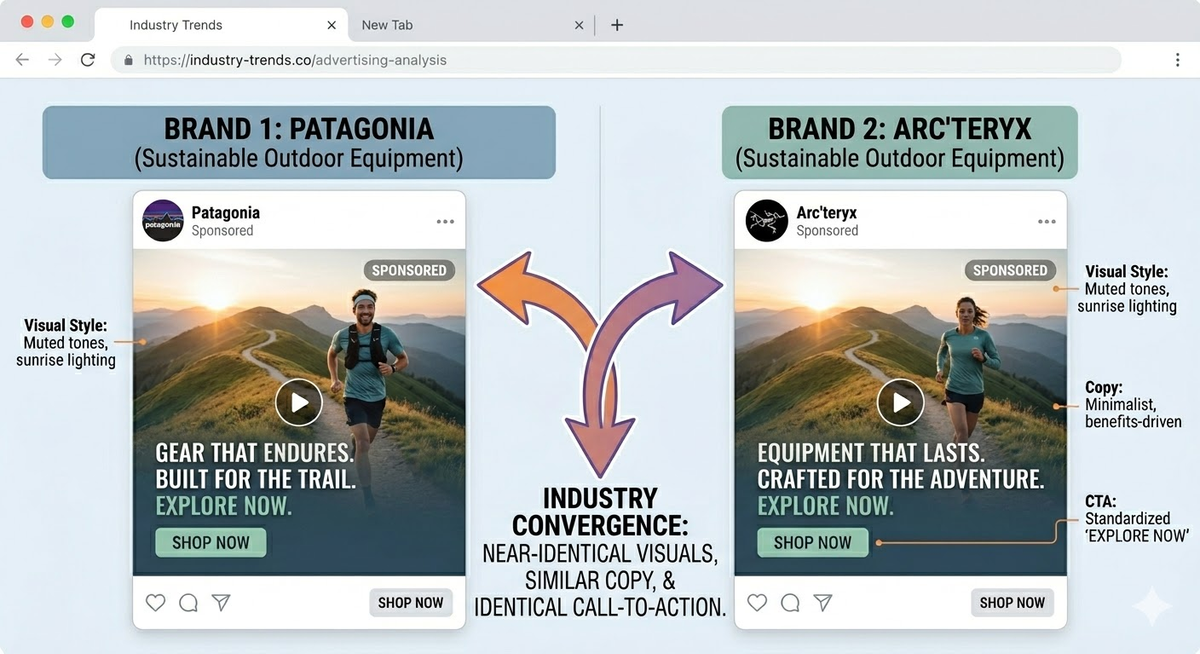
What this looks like in practice. Say you sell fitness supplements. You search "protein powder" in the Ad Library, filter by active ads in your target country, and sort by impressions. You notice the top three ads across different brands all use short-form UGC video with a "taste test" hook. Two of them have been running for 90+ days. That tells you the UGC taste test format is validated at the market level: it is worth testing in your own campaigns (with your own unique creative, not a copy).
Here is a repeatable weekly workflow that turns Ad Library browsing into structured competitive intelligence. Budget 30-45 minutes per week.
Step 1: Build your watchlist. Identify 10-20 advertisers to track. Include direct competitors, adjacent brands (companies targeting the same audience with different products), and 2-3 aspirational brands (larger companies whose creative quality you admire). Save the Ad Library URL for each advertiser's page.
Step 2: Weekly audit. For each advertiser, check: How many active ads are they running? (Volume indicates budget and testing velocity.) What new ads launched this week? (New creatives signal product launches, offer changes, or seasonal pushes.) Which older ads are still running? (These are the proven performers.) Have any previously active ads disappeared? (Killed creatives tell you what failed.)
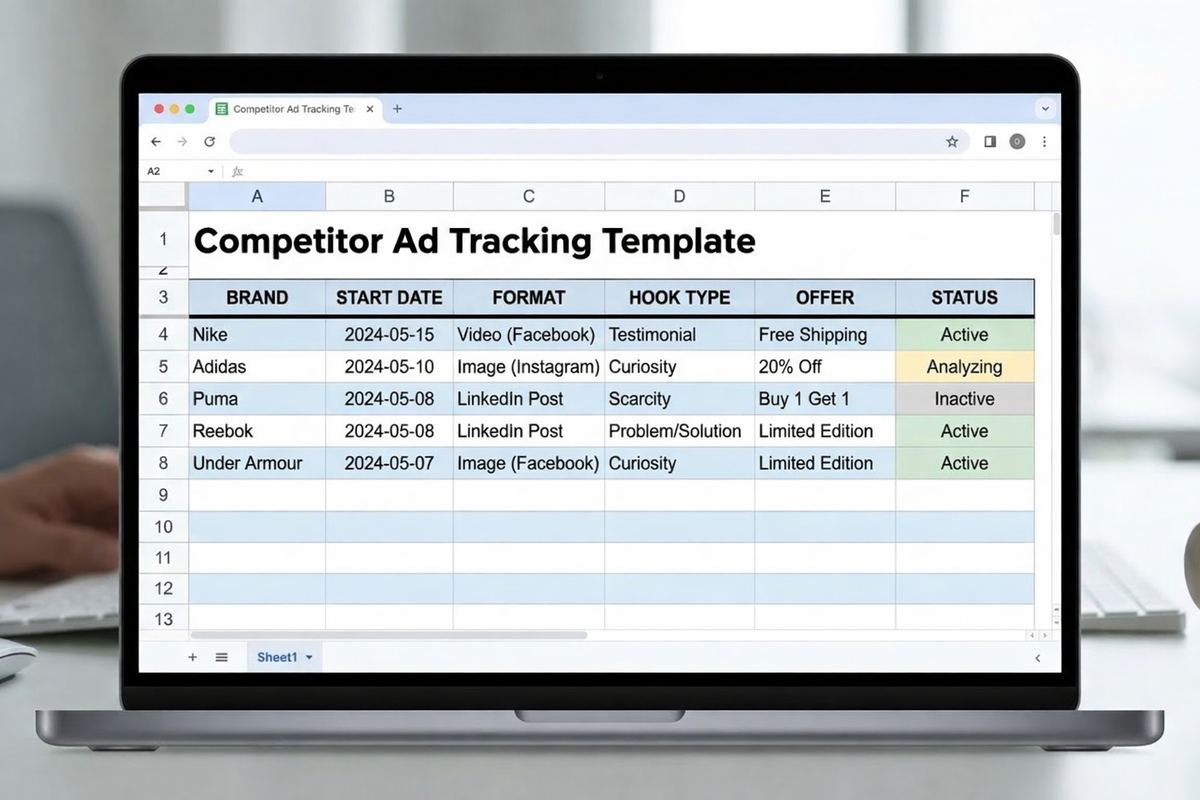
Step 3: Categorise what you find. For every ad worth noting, record: the hook (first 3 seconds of video or first line of copy), the format (static, video, carousel, UGC, studio), the offer (discount, free trial, bundle, urgency), the CTA (shop now, learn more, sign up), and the landing page structure.
Step 4: Identify patterns. After 3-4 weeks of consistent auditing, patterns emerge. You might notice that all your competitors lead with social proof in their hooks but nobody addresses a specific objection. Or that everyone uses video but nobody runs carousels for your product category. These patterns, and especially the gaps are where your creative strategy lives.
Step 5: Build test hypotheses. Translate your findings into specific, testable hypotheses for your own campaigns. Format them as: "If we [creative approach], then [expected outcome], because [evidence from competitor research]."
For example: "If we lead with a UGC taste-test hook in a 15-second Reel format, CTR will increase vs. our current studio video, because 4 out of 5 top-impression competitor ads in our niche use this exact format."
The Ad Library API provides programmatic access to ad data, which is useful if you want to automate competitor monitoring or analyse ads at scale. It is free to use but requires a verified Meta developer account.
What the API offers that the UI does not: the ability to search across large datasets programmatically, filter by multiple parameters simultaneously, pull structured data into spreadsheets or dashboards, and monitor changes over time without manual checking.
What the API does not offer: performance metrics. The API returns the same transparency data as the web interface: creative information, run dates, platform distribution, and for EU/political ads, spend and impression ranges. It does not provide CTR, conversion, or audience composition data for commercial ads.
Practical use case. Set up a weekly automated pull that searches for all active ads from your top 10 competitors, filters by start date (last 7 days), and outputs the results into a Google Sheet. This gives your team a structured weekly briefing on new competitor creative without anyone manually browsing the Ad Library.
For teams that want this level of intelligence without building API integrations, tools like Adam by Deepsolv automate the entire competitor tracking and creative analysis workflow, monitoring competitor ads continuously, flagging new launches, and using AI to identify patterns across your competitive landscape.
Being honest about the library's limitations is as important as knowing its strengths. Here is where it cannot help you.
No performance data. You cannot see CTR, CPC, conversion rates, or ROAS. You are always inferring performance from proxy signals (longevity, impressions, variation count), never measuring it directly.
No precise targeting information. Outside of EU-specific transparency data, you cannot see the audiences an advertiser is targeting. You know what they are saying, but not who they are saying it to.
Paused ads disappear. When an advertiser pauses or deletes an ad, it vanishes from the library entirely (except for political/social issue ads, which are archived for 7 years). If you did not save it, you cannot reference it later. This makes consistent weekly auditing important.
No cross-platform view. The Meta Ad Library only covers Meta's platforms. Your competitors are almost certainly also running ads on Google, TikTok, YouTube, and LinkedIn. Limiting your research to one platform gives you an incomplete picture.
Data interpretation requires experience. A long-running ad might be a winner or it might be a retargeting campaign running to a small audience at low spend. High impressions might signal performance or it might signal a large awareness campaign that is not optimised for conversions. Context matters, and the library provides limited context.
For teams that need to go beyond what the free Ad Library offers automated monitoring, cross-platform intelligence, AI-powered creative analysis, and pattern detection: Adam by Deepsolv is built specifically for this use case. It takes the manual workflow described in this guide and automates it, so your team spends time on creative strategy rather than data collection.
In February 2026, Meta integrated Manus AI: an autonomous agent technology acquired from a Chinese AI startup directly into Ads Manager. Manus can generate reports, conduct audience research, and perform competitive analysis using natural language commands.
This is relevant to Ad Library users because Manus has direct access to Meta's ad data through the API, which means it can compile competitor reports faster than manual browsing. However, early testing by agencies has shown inconsistencies: Manus sometimes misinterprets Meta's complex ad data structures, producing inaccurate insights.
For a detailed breakdown of what Manus can and cannot do, how to access it, and how it compares to dedicated ad intelligence tools, read our complete guide: Manus AI in Meta Ads Manager: What It Actually Does and What It Can't.
Copying instead of learning. The goal is to identify patterns: hook structures, offer frameworks, visual approaches not to duplicate a competitor's creative. Copying is legally risky and strategically pointless because your brand, audience, and product context are different.
Assuming every active ad is a winner. Some running ads are new tests (launched days ago with no performance data yet). Some are retargeting campaigns running to tiny audiences. Some are simply forgotten, the advertiser has not reviewed their account in weeks. Longevity plus impression volume is a much more reliable signal than active status alone.
Researching only direct competitors. Keyword-based searches across your entire category surface angles, offers, and formats that brand-level searches miss. Search for product categories, pain points, and use cases, not just company names.
One-time browsing instead of consistent monitoring. The Ad Library's value compounds over time. A single visit gives you a snapshot. Weekly monitoring over 4-8 weeks reveals testing patterns, seasonal shifts, and strategic pivots that a snapshot misses entirely.
Ignoring the landing page. The ad is only half the story. Always click through to see the landing page structure, offer presentation, and conversion flow. Sometimes the biggest insight is not the creative, it is how a competitor structures the post-click experience.
Ready to move from manual competitor research to automated ad intelligence? Adam by Deepsolv monitors your competitive landscape continuously, flags new competitor launches, and uses AI to identify the creative patterns that matter so your team spends time building better ads, not browsing the Ad Library. Start your free trial →
FAQs
Frequently asked questions related to this blog post